> For the complete documentation index, see [llms.txt](https://ahmed-tarek.gitbook.io/security-notes/llms.txt). Markdown versions of documentation pages are available by appending `.md` to page URLs; this page is available as [Markdown](https://ahmed-tarek.gitbook.io/security-notes/owsap-top-10-2025/a04-cryptographic-failures/clear-text-transmission-of-sensitive-data.md).

# Clear Text Transmission Of Sensitive Data

Some applications transmit passwords over unencrypted connections, making them easy targets for interception. Attackers can exploit this by eavesdropping on network traffic, especially over **public Wi-Fi, corporate, or home networks with compromised devices**.

Many communication channels can be **sniffed** by anyone with network access, making exploitation **remarkably easy**.

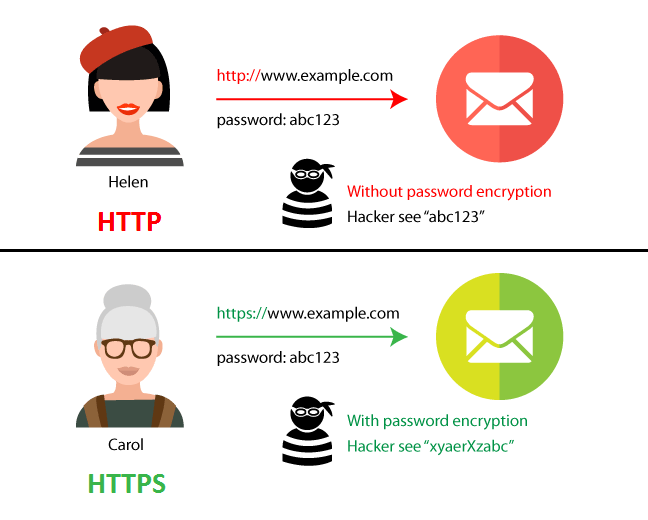
We've all seen **HTTP vs. HTTPS**, but many don’t realize the difference. If your website **handles logins, transactions, or user data**, **HTTPS is a must**. If it's purely static (no sensitive interactions), HTTP *may* be fine—but HTTPS is still recommended for security and trust.

### **Difference Between HTTP and HTTPS**

***HTTP*** :

* An **application-layer protocol** for communication between web browsers and servers.
* **Lacks data integrity**—attackers can tamper with transmitted data.
* **Transmits data in plaintext**, making it readable to anyone intercepting the traffic.

***HTTPS*** :&#x20;

* **Encrypts communication** to protect data integrity and privacy.
* **Prevents attackers from tampering** with data exchanged between websites and users.

<figure><img src="https://miro.medium.com/v2/resize:fit:648/1*wD9_iLMGg2FSL-rG7dhx7w.png" alt="" height="520" width="648"><figcaption><p>Difference between HTTP &#x26; HTTPS</p></figcaption></figure>

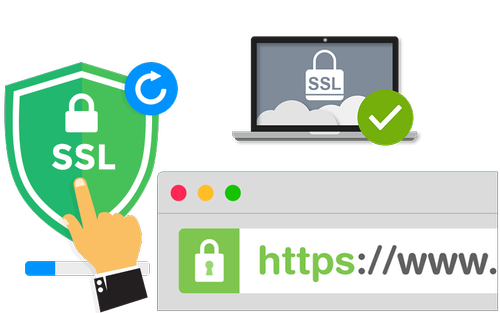
HTTPS uses **SSL/TLS encryption**, which secures data with a **public key (widely known)** and a **private key (kept secret by the recipient)**.

<figure><img src="https://miro.medium.com/v2/resize:fit:500/1*V5dbeST20vxX1xFZwBBCOg.png" alt="" height="313" width="500"><figcaption><p>Secure Socket Layer</p></figcaption></figure>

**How to find this vulnerability ?**

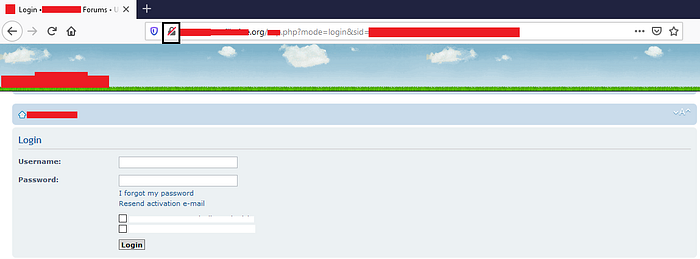
1. Your target website is using http on the login panel

<figure><img src="https://miro.medium.com/v2/resize:fit:700/1*jBwimREx6kfQPwuwHh7WBw.png" alt="" height="259" width="700"><figcaption><p>Login Panel without HTTPS</p></figcaption></figure>

2\. Start WireShark for intercepting traffic

<figure><img src="https://miro.medium.com/v2/resize:fit:700/1*VoeB5KPxkKPrpUVU5F5Edw.png" alt="" height="394" width="700"><figcaption><p>WireShark</p></figcaption></figure>

Here I have selected Wi-Fi because my PC is connected to Wi-Fi

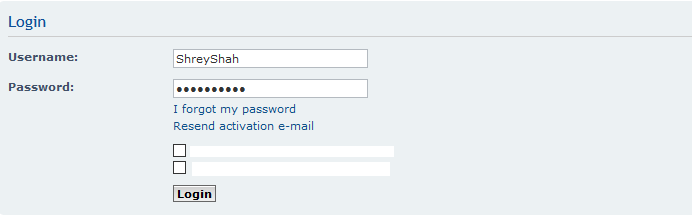
3\. Start packet capturing in WireShark and login to your website

<figure><img src="https://miro.medium.com/v2/resize:fit:693/1*NX3o-C62ialMZye15KCVPg.png" alt="" height="216" width="693"><figcaption><p>Logging In</p></figcaption></figure>

Here you can see the username but the password is hidden, let’s check in the WireShark.

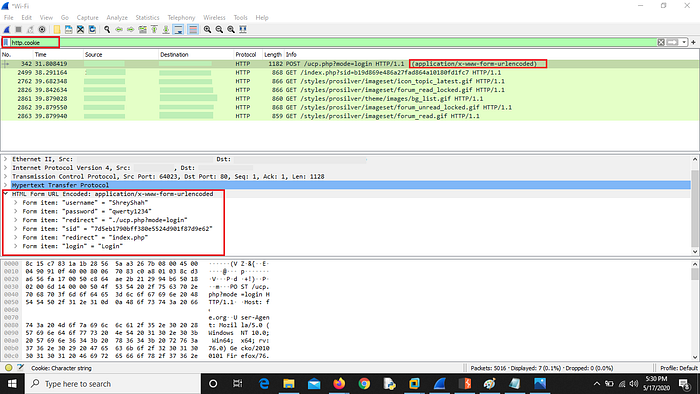
4\. Go to WireShark and apply this filter : http.cookie

<figure><img src="https://miro.medium.com/v2/resize:fit:700/1*3EYV8nEMcsUyTDjtJP5iMg.png" alt="" height="394" width="700"><figcaption><p>WireShark Logs</p></figcaption></figure>

Any attacker can steal the sensitive information if he/she is in the network.

So this was simple and known to many people but what if every GET request is secured ? The website you visit is using HTTPS, so now what to do ? Have you ever tried for POST request ? Let’s Check it.

On the same website I saw the page was having [https://www.website.com](https://www.website.com/) but when I intercepted the request using burp suite and I saw the POST request for saving the data was using HTTP protocol and I again intercepted it using WireShark and every thing was visible

**Exploiting POST Method :**

1. Your website is using HTTPS for every GET request

<figure><img src="https://miro.medium.com/v2/resize:fit:700/1*HVKUqPfMksVO1ZJiabaaiw.png" alt="" height="311" width="700"><figcaption><p>HTTPS GET request</p></figcaption></figure>

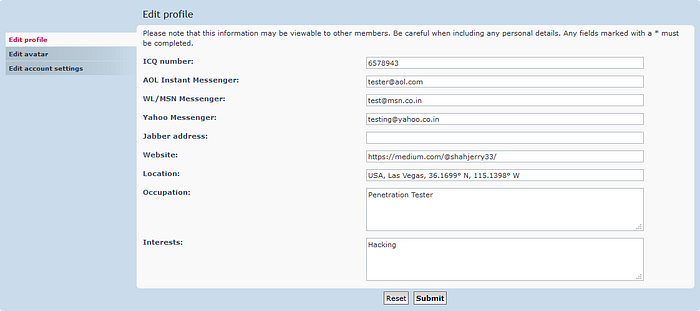
This page was using HTTPS when you visit it. Now this is private information which is visible to user itself but not to an attacker as the GET request is secure by HTTPS protocol

2\. Fill the form and Intercept the request using burp suite to check if the POST request is using HTTPS or HTTP for saving or transferring data

<figure><img src="https://miro.medium.com/v2/resize:fit:700/1*4vwszsnpsG7LpzM4_EP1KQ.png" alt="" height="394" width="700"><figcaption><p>Burp Suite HTTP POST request</p></figcaption></figure>

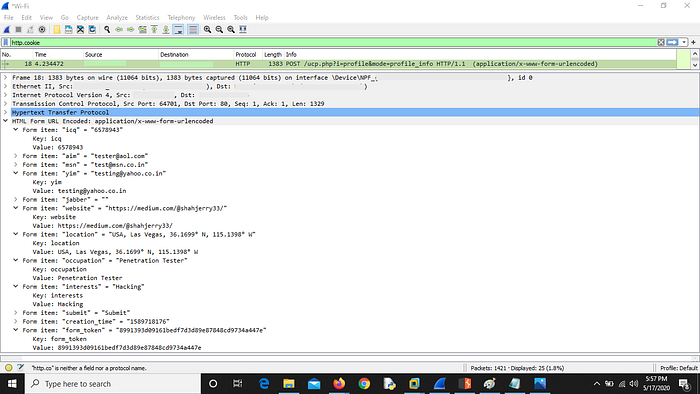
3\. Now check WireShark logs for the same request using same filter : http.cookie

<figure><img src="https://miro.medium.com/v2/resize:fit:700/1*b424IwtdpF6pWwXcNRRtdw.png" alt="" height="394" width="700"><figcaption><p>WireShark Logs</p></figcaption></figure>

NOTE : You can perform this attack on POST requests like changing password, sending messages, publishing private post, transferring payments etc.

Reports :&#x20;

[https://hackerone.com/reports/214571](<https://hackerone.com/reports/813159&#xD;&#xA;https://hackerone.com/reports/2129769&#xD;&#xA;https://hackerone.com/reports/902733&#xD;&#xA;https://hackerone.com/reports/2337938&#xD;&#xA;https://hackerone.com/reports/2230842&#xD;&#xA;https://hackerone.com/reports/1987680&#xD;&#xA;https://hackerone.com/reports/2437131&#xD;&#xA;https://hackerone.com/reports/214571&#xD;&#xA;https://hackerone.com/reports/1753226&#xD;&#xA;https://hackerone.com/reports/1709815&#xD;&#xA;https://hackerone.com/reports/1813831&#xD;&#xA;https://hackerone.com/reports/1565622&#xD;&#xA;https://hackerone.com/reports/1213181&#xD;&#xA;https://hackerone.com/reports/1730660&#xD;&#xA;https://hackerone.com/reports/1517377&#xD;&#xA;>)\[<https://hackerone.com/reports/813159>\\

<https://hackerone.com/reports/2337938>

\
<https://hackerone.com/reports/1987680>]\(<https://hackerone.com/reports/813159&#xD;&#xA;https://hackerone.com/reports/2129769&#xD;&#xA;https://hackerone.com/reports/902733&#xD;&#xA;https://hackerone.com/reports/2337938&#xD;&#xA;https://hackerone.com/reports/2230842&#xD;&#xA;https://hackerone.com/reports/1987680&#xD;&#xA;https://hackerone.com/reports/2437131&#xD;&#xA;https://hackerone.com/reports/214571&#xD;&#xA;https://hackerone.com/reports/1753226&#xD;&#xA;https://hackerone.com/reports/1709815&#xD;&#xA;https://hackerone.com/reports/1813831&#xD;&#xA;https://hackerone.com/reports/1565622&#xD;&#xA;https://hackerone.com/reports/1213181&#xD;&#xA;https://hackerone.com/reports/1730660&#xD;&#xA;https://hackerone.com/reports/1517377&#xD;&#xA;>)<https://hackerone.com/reports/173268>\[

\\

<https://hackerone.com/reports/1565622>]\(<https://hackerone.com/reports/813159&#xD;&#xA;https://hackerone.com/reports/2129769&#xD;&#xA;https://hackerone.com/reports/902733&#xD;&#xA;https://hackerone.com/reports/2337938&#xD;&#xA;https://hackerone.com/reports/2230842&#xD;&#xA;https://hackerone.com/reports/1987680&#xD;&#xA;https://hackerone.com/reports/2437131&#xD;&#xA;https://hackerone.com/reports/214571&#xD;&#xA;https://hackerone.com/reports/1753226&#xD;&#xA;https://hackerone.com/reports/1709815&#xD;&#xA;https://hackerone.com/reports/1813831&#xD;&#xA;https://hackerone.com/reports/1565622&#xD;&#xA;https://hackerone.com/reports/1213181&#xD;&#xA;https://hackerone.com/reports/1730660&#xD;&#xA;https://hackerone.com/reports/1517377&#xD;&#xA;>)<https://hackerone.com/reports/1213181>\[\\

<https://hackerone.com/reports/1730660>]\(<https://hackerone.com/reports/813159&#xD;&#xA;https://hackerone.com/reports/2129769&#xD;&#xA;https://hackerone.com/reports/902733&#xD;&#xA;https://hackerone.com/reports/2337938&#xD;&#xA;https://hackerone.com/reports/2230842&#xD;&#xA;https://hackerone.com/reports/1987680&#xD;&#xA;https://hackerone.com/reports/2437131&#xD;&#xA;https://hackerone.com/reports/214571&#xD;&#xA;https://hackerone.com/reports/1753226&#xD;&#xA;https://hackerone.com/reports/1709815&#xD;&#xA;https://hackerone.com/reports/1813831&#xD;&#xA;https://hackerone.com/reports/1565622&#xD;&#xA;https://hackerone.com/reports/1213181&#xD;&#xA;https://hackerone.com/reports/1730660&#xD;&#xA;https://hackerone.com/reports/1517377&#xD;&#xA;>)<https://hackerone.com/reports/751581>\[\\

]\(<https://hackerone.com/reports/813159&#xD;&#xA;https://hackerone.com/reports/2129769&#xD;&#xA;https://hackerone.com/reports/902733&#xD;&#xA;https://hackerone.com/reports/2337938&#xD;&#xA;https://hackerone.com/reports/2230842&#xD;&#xA;https://hackerone.com/reports/1987680&#xD;&#xA;https://hackerone.com/reports/2437131&#xD;&#xA;https://hackerone.com/reports/214571&#xD;&#xA;https://hackerone.com/reports/1753226&#xD;&#xA;https://hackerone.com/reports/1709815&#xD;&#xA;https://hackerone.com/reports/1813831&#xD;&#xA;https://hackerone.com/reports/1565622&#xD;&#xA;https://hackerone.com/reports/1213181&#xD;&#xA;https://hackerone.com/reports/1730660&#xD;&#xA;https://hackerone.com/reports/1517377&#xD;&#xA;>)[https://hackerone.com/reports/2129769](<https://hackerone.com/reports/813159&#xD;&#xA;https://hackerone.com/reports/2129769&#xD;&#xA;https://hackerone.com/reports/902733&#xD;&#xA;https://hackerone.com/reports/2337938&#xD;&#xA;https://hackerone.com/reports/2230842&#xD;&#xA;https://hackerone.com/reports/1987680&#xD;&#xA;https://hackerone.com/reports/2437131&#xD;&#xA;https://hackerone.com/reports/214571&#xD;&#xA;https://hackerone.com/reports/1753226&#xD;&#xA;https://hackerone.com/reports/1709815&#xD;&#xA;https://hackerone.com/reports/1813831&#xD;&#xA;https://hackerone.com/reports/1565622&#xD;&#xA;https://hackerone.com/reports/1213181&#xD;&#xA;https://hackerone.com/reports/1730660&#xD;&#xA;https://hackerone.com/reports/1517377&#xD;&#xA;>)